

Goals
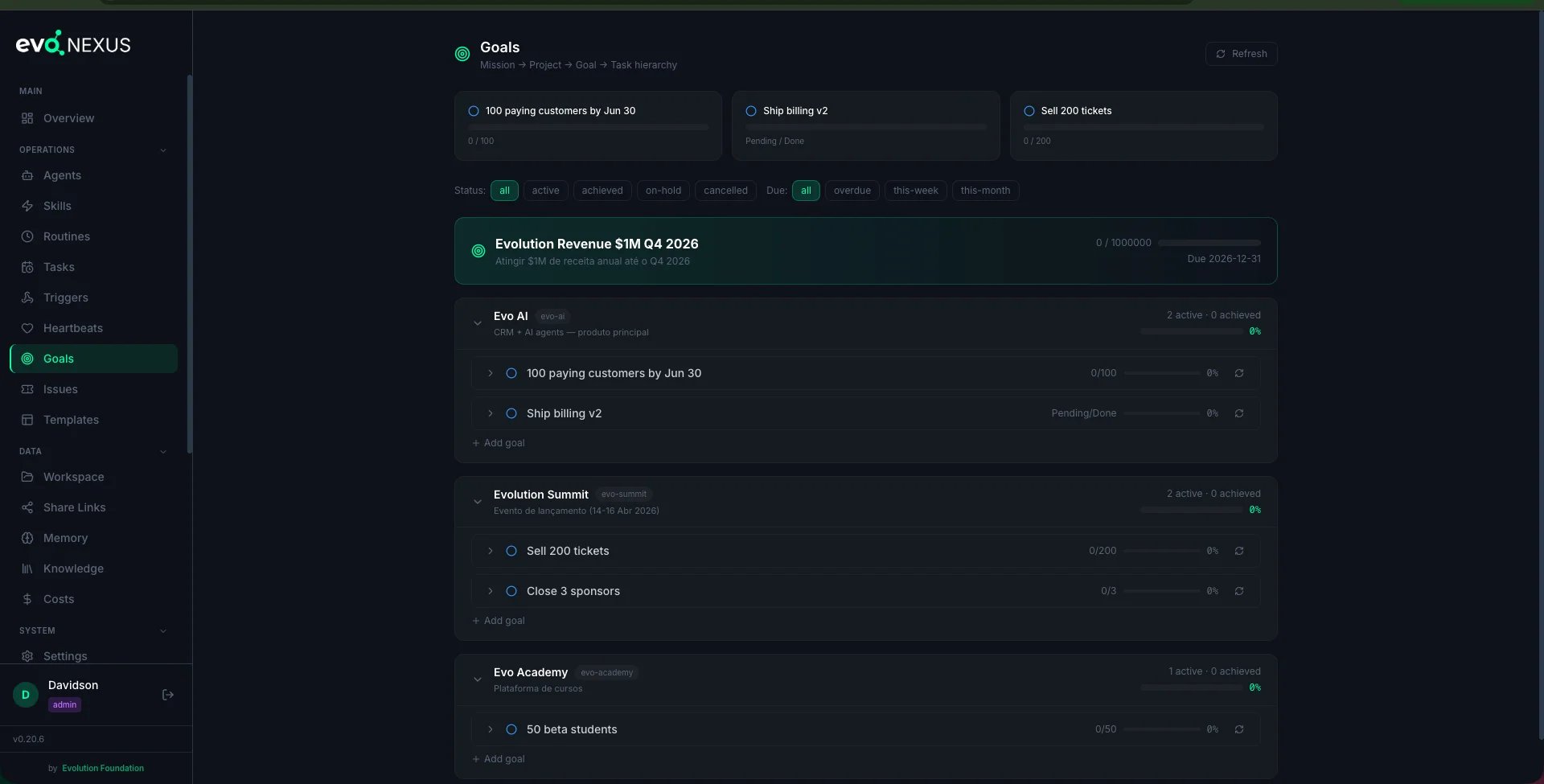
The Hierarchy
Missions are optional — a project can stand alone. Goals are required to belong to a project. Tasks optionally belong to a goal (if they do, completing them rolls into
current_value).
Why It Matters
Three things happen when you link work to a goal:- Routines inject goal context. A routine with
goal_id: mrr-80kinconfig/routines.yamltells the agent: “this is the outcome you’re working toward.” Reports, analyses, and recommendations become sharper because the agent knows what “good” looks like. - Heartbeats inject goal context. Same mechanism — a heartbeat with a
goal_idgives the proactive agent an anchor. - Progress is visible. The dashboard shows every goal with
current_value / target_value, due date, and status. Stale or overdue goals surface automatically.
Creating a Goal
Via the create-goal skill (recommended)
From Claude Code:
“Create a goal to reach 80k MRR by June 30.”The skill walks you through:
- Pick (or create) a mission
- Pick (or create) a project under it
- Define the goal — title, metric type, target, due date
- (Optional) attach starter tasks
- (Optional) link an existing routine
Via the dashboard
The Goals page has a “New Goal” form. Same fields, same hierarchy.Via the API
Metric Types
The dashboard renders each type with the right formatting (currency with symbol, percent with
%, etc.).
Progress Tracking
Automatic (via tasks)
Tasks roll up intocurrent_value:
- Create tasks with
goal_id: {numeric_id} - When a task’s
statusflips todone, the backend recomputescurrent_valuefrom the SQL viewgoal_progress_v - When
current_value >= target_value, the goal’sstatusflips toachieved
Manual (direct PATCH)
Non-task metrics (MRR, NPS, follower count) need direct updates:fin-pulse routine that PATCHes the MRR goal with the latest Stripe figure.
Drift correction
If task counts get out of sync withcurrent_value:
Linking a Routine
goal_id: mrr-80k into the matching routine entry in config/routines.yaml. Every future run of that routine will see the goal context.
Linking a Heartbeat
Heartbeats acceptgoal_id in their YAML entry:
Linking a Ticket
Tickets take a numericgoal_id on creation or via PATCH:
Viewing Progress
Dashboard
The Goals page groups goals by project, shows progress bars, flags overdue items in red, and lets you filter by status (active, achieved, dropped), due window (overdue, this-week, this-month), or project.
API
Anti-patterns
- Goals without metrics. “Make the product better” isn’t a goal — it’s a wish. Every goal needs
metric_type,target_value, anddue_date. - Goals that never change state. If
current_valuedoesn’t move for weeks, the goal is either stale (archive it) or not wired to a signal (add a routine that updates it). - Overloading missions. A mission should span a quarter or longer. If you’re creating a mission per week, flatten them into projects.
- Linking a routine to a non-existent goal slug. The API returns 404. Confirm the slug with
GET /api/goalsfirst.
CLI Skills
Related
docs/heartbeats.md— wake agents on intervals with goal contextdocs/tickets.md— persistent work units linkable to goals- Source:
dashboard/backend/routes/goals.py,dashboard/backend/goal_context.py